

Choosing the right IDE is a big importance for developers in these days. So this article is to represent that using a well-designed IDE like JetBrains Rider can significantly improve your code quality, productivity, performance and ease development.
Now a day, we can find many different development tools available. And JetBrains Rider, surely, is one of the best and intelligent tool that can be used to development on the .NET framework. Rider is a powerful and useful tool developed by the JetBrains.
Rider could support for many operating systems including Windows, Mac OS and Linux (cross-platform) as it provides smartness from an analyzing tool, speed from an IDE and high productivity. Consequently, many developers are using this IDE in individual and teams. No matter you are developing the web application, desktop application or games by using Unity, Rider helps you lot in these processes:
Table of Contents
What is JetBrains Rider?
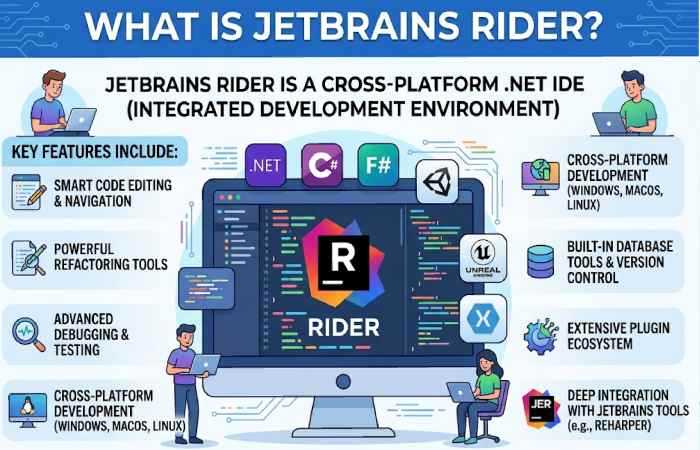
JetBrains Rider is a modern, cross-platform Integrated Development Environment (IDE) built specifically for .NET development. Developed by JetBrains, it combines the powerful IntelliJ platform with the .NET tooling from ReSharper.
It is widely used for:
- ASP.NET development
- C# programming
- Unity game development
- Cross-platform .NET projects
What Can You Do with JetBrains Rider?
With Rider, developers can:
- Build web apps (ASP.NET, .NET Core)
- Create desktop applications
- Develop games using Unity
- Write code in languages like:
-
- C#
- F#
- VB.NET
- JavaScript, HTML, CSS, SQL
Why Choose JetBrains Rider for .NET Development?
| Feature / Benefit | Why It Matters for .NET Developers | Real Advantage |
| Cross-Platform Support | Works on Windows, macOS, and Linux | Build and run .NET apps anywhere without switching IDEs |
| Built-in ReSharper Engine | Advanced code inspections and refactoring tools | Write cleaner, error-free code faster with 2200+ inspections |
| Fast Performance | Optimized architecture and responsive UI | Faster project loading and smoother coding experience |
| Full .NET Ecosystem Support | Supports .NET Core, ASP.NET, Xamarin, Unity | Develop web, desktop, and game apps in one IDE |
| Intelligent Code Editor | Smart auto-completion, navigation, and suggestions | Reduces coding errors and boosts productivity |
| Powerful Debugging & Testing | Built-in debugger and unit testing tools | Easier bug fixing and reliable code deployment |
| Full-Stack Development | Supports frontend + backend (JS, TS, HTML, CSS, SQL) | One IDE for entire application development |
| Version Control Integration | Git, Mercurial, and more built-in | Seamless collaboration and code management |
Key Features of JetBrains Rider
- Cross-Platform Support
Unlike many IDEs, Rider runs smoothly on:
- Windows
- macOS
- Linux
- Built-in ReSharper Engine
- Advanced code analysis
- Smart refactoring tools
- Real-time error detection
- Unity & Game Development
Rider is a top choice for developers using Unity:
- Debugging support
- Shader editing
- Performance insights
- Fast Performance
- Lightweight compared to Microsoft Visual Studio
- Efficient memory usage
- Database & Cloud Integration
- Built-in database tools
- Integration with Azure and AWS
Pros and Cons of JetBrains Rider

Pros
- Excellent performance
- Cross-platform compatibility
- Powerful refactoring tools
- Strong Unity support
- Clean and modern UI
Cons
- Paid IDE (not fully free)
- Slight learning curve for beginners
- Heavier than lightweight editors like Visual Studio Code
JetBrains Rider vs Competitors (USA Overview)
| Feature | JetBrains Rider | Visual Studio | VS Code | IntelliJ IDEA | Eclipse |
| Type | Full IDE | Full IDE | Code Editor | Full IDE | Full IDE |
| Best For | .NET, Unity | Enterprise .NET | Web & scripting | Java dev | Java dev |
| OS Support | Windows, macOS, Linux | Windows (Full), Mac (limited) | All | All | All |
| Performance | Fast & optimized | Heavy | Very lightweight | Medium | Medium |
| Built-in Tools | Advanced | Very advanced | Minimal | Advanced | Basic |
| Extensions | Moderate | Huge ecosystem | Massive | Huge | Large |
| Pricing (USA) | Paid ($149+/yr) | Free + Paid tiers | Free | Paid | Free |
Pricing Comparison (USA)
| Tool | Pricing | Free Option | Resource Link |
| JetBrains Rider | $149/year (individual) | Trial + student free | https://www.jetbrains.com/rider/buy/ |
| Visual Studio | Free → $45+/month | Yes (Community) | https://visualstudio.microsoft.com/ |
| Visual Studio Code | Free | Yes | https://code.visualstudio.com/ |
| IntelliJ IDEA | $149/year | Community edition | https://www.jetbrains.com/idea/ |
| Eclipse IDE | Free | Yes | https://www.eclipse.org/ |
Best Alternatives to JetBrains Rider
- Microsoft Visual Studio
- Best for enterprise .NET development
- Free Community edition available
- Visual Studio Code
- Lightweight and free
- Requires extensions for full .NET support
- Eclipse IDE
- Open-source IDE
- Better for Java but extensible
- MonoDevelop
- Open-source .NET IDE
- Limited updates compared to Rider
Who Should Use JetBrains Rider?
Rider is ideal for:
- Professional .NET developers
- Unity game developers
- Cross-platform development teams
- Developers who prefer performance over bulk
Not ideal for:
- Beginners with zero coding experience
- Developers looking for a completely free IDE
Free vs Paid Version: What Do You Actually Get?
| Feature / Access | Free Version (Non-Commercial) | Paid Version (Individual / Business) | Price (Approx) | Resource Link |
| License Type | Free for personal, learning, and open-source use | Required for commercial/business use | Free vs Paid | https://www.jetbrains.com/rider/ |
| Cost | ₹0 | ₹1,500–₹3,500/month (India approx) | $16.9+/month | https://www.jetbrains.com/rider/ |
| Feature Access | Full IDE features included | Full IDE features included | Same features | https://www.jetbrains.com/rider/features/ |
| Usage Restriction | No commercial use allowed | Commercial use allowed | — | https://blog.jetbrains.com/blog/2024/10/24/webstorm-and-rider-are-now-free-for-non-commercial-use/ |
| Target Users | Students, hobbyists, open-source contributors | Freelancers, companies, enterprise teams | — | https://www.jetbrains.com/rider/ |
| Free Trial | Not needed (already free for non-commercial) | 30-day free trial available | 30 days | https://www.jetbrains.com/rider/ |
| AI Features | Limited/free tier with usage quotas | Advanced AI features & higher limits | Included in paid tiers | https://www.jetbrains.com/ai/ |
| Support | Community support | Priority/official support | Included in paid plans | https://www.jetbrains.com/support/ |
| Updates & Plugins | Full access to updates and plugins | Full access + enterprise tools | Same core access | https://www.jetbrains.com/rider/ |
| Team & Enterprise Tools | Not included | Includes team management, licensing, SSO | Paid only | https://www.jetbrains.com/store/ |
Common Mistakes to Avoid
- Ignoring free licenses (students/open source)
- Not using built-in refactoring tools
- Comparing it directly with lightweight editors
- Underutilizing Unity integration
Is JetBrains Rider Worth It in 2026?

Short answer:
Yes—JetBrains Rider is absolutely worth it in 2026 for the right type of developer. But it’s not the best choice for everyone.
Let’s break it down honestly
When JetBrains Rider Is Worth It
- You’re a Professional .NET Developer
Rider is built specifically for C# and .NET, with:
- 1600+ code inspections
- Advanced refactoring tools
- Deep debugging support
It helps you write cleaner code faster, which directly improves productivity.
- You Work Across Multiple Platforms
Unlike Microsoft Visual Studio, Rider runs on:
- Windows
- macOS
- Linux
This makes it a top choice for cross-platform teams.
- You Value Performance & UI Experience
Many comparisons show Rider:
- Starts faster
- Feels more responsive
- Has a cleaner UI
It’s designed to avoid the “heavy IDE” feel.
- You Do Unity or Game Development
Rider is one of the best IDEs for:
- Unity integration
- Game debugging
- Performance insights
Many game developers prefer it over alternatives.
- You Want Built-in Advanced Features (No Plugins Needed)
Unlike Visual Studio Code, Rider comes with:
- Refactoring tools
- Code inspections
- Testing tools
Everything works “out of the box”
FAQs
Is It free?
No, but it offers free licenses for students, teachers, and open-source contributors.
Is Rider better than Visual Studio?
It depends. Rider is faster and cross-platform, while Visual Studio is more feature-rich for Windows.
Can beginners use It?
Yes, but beginners may find Visual Studio Code easier initially.
Is Rider good for Unity?
Yes, it is one of the best IDEs for Unity development.
Final Conclusion
It stands out as one of the most powerful and efficient IDEs for modern .NET development. Its cross-platform support, intelligent coding tools, and deep integration with Unity make it a strong choice for professionals. While it comes at a cost, the productivity gains and performance benefits often justify the investment—especially for serious developers and teams.